When I export a part as STL or STEP or OBJ it produces a file type called “file” and i cannot open it with any other program. When saving it only shows Save as Type: All Files.
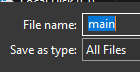
Hi FT. I wasn’t able to reproduce this, when I export STL and STEP files, it saves them with the right prefix. Can you show me a video recording of this, or maybe share your Zoo file (the .kcl)?
I assume you’re on Windows based on the filepicker UI in the screenshot, but which version of Windows? Also which version of the app is this?
Update: I was able to reproduce, you’re right. This happens on web, but not on our desktop app. We’ll triage and fix this, thank you!
Filed Export filetype not being set on web app · Issue #10042 · KittyCAD/modeling-app · GitHub to track this bug.
Fixed the bug, thanks very much. The fix should be live soon!